Before i loose anyone right at the beginning, this is not to bash Microsoft or windows, but solely to highlight linux but not put it above windows either. Both have their uses in their own right. With that out of the way let us start with a small history lesson.

Linux has been around for a very long time, in 1991 Linus Torvalds created a system kernel for his own personal use, at first there was no real intention to make it usable on any other platform but only a short time later the kernel has expanded to a huge array of different devices, from pcs to routers to phones, it is used in many devices you probably wouldn’t even think of. It was free of use the moment it has gone public, everybody could use it and alter it to their own wishes and is another huge factor that made it so widely used. all 500 of the top supercomputers all run linux.
But lets not get to far ahead, what IS the Linux kernel exactly? The linux kernel can be considered the brain and skeleton of an operating system, without the kernel it can not function properly. On top of said kernel all Linux operating systems build on to make their own unique OS.
Distributions (distros for short) and package managers
If an operating system is built on top of the linux kernel it isnt really referred to as an OS, one such “OS” is usually referred to as a “distribution” since its build on preexisting lines of codes.
There is one last thing a distro needs to fully function, a package manager, without the package manager you would not be able to install programs. for example, it could be compared to windows and their exe file format, it functions only in windows and without it no program could be installed or work correctly, in the same way a linux distro has their own file format it needs to function, unless said distro is built on top of an already existing distro. Let me give some examples of distros that have been made on top of the linux kernel, and than well shall dive deeper into what makes linux even more unique.
Distributions build on the linux kernel.
Here i will provide a few examples of “made from scratch” linux distros, there are quite a few so i will only go over a few popular ones.
let us start with the de facto linux distro, the oldest still in development distro to this day and the one distro msot often used as a base for others.
Debian
Debian has been released in 1992 and is in development to this day. from 1994 to 1995 debian was funded by FSF (free software foundation) both parties keeping the free nature of linux. When the partnership ended debian formed their own nonprofit so they could continue working on debian while always keeping it free at the same time.

Red Hat linux
Red hat linux, developed in 1994, a popular distro that is not only for the regular user but is often used by companys and smaller independent studios. 20 years ago when graphical installers have not been very common yet red hat introduced the g-installer known as Anaconda to make installations a little easier.

Arch linux
Arch linux can be considered an outliner in the linux world, it does not offer a graphical installer like most distros today, developed in 2002 arch follows what is known as the KISS principle, K-eep I-i S-imple S-stupid, as such when one decides to install arch they have to do by hand what graphical installers offer, it doesnt have its own desktop either, but due to its “simple” nature many users swear by it as it inevitable makes you more understanding of the linux system and your own pc as a result.
It is not recommend for beginners at all.
The biggest thing that sets it apart is its package manager and wiki, the AUR ( arch user repository) is considered the holy grail of programs, if there is a niche program you need its very likely someone made it available on the AUR, its very uncommon to not find something on the AUR. The AUR very possibly dwarfs any other package manager with the sheer amount of things it has.

Solus
Even under original linux distros solus can be considered a little special, it is a very young system only existing since 2015, but in that short amount of time it managed to garner its own devoted following due to its clean interface and their original in house developed desktop known as budgie.

Opensuse
opensuse is another longtime runner of original distros, most popular in enterprise spaces this can be considered the de facto distro for companys due to how widely its used by them.

Distributions made over others distros
Here is where the real beauty of linux shines, 99% of distros are all free, no charges to use the distro in question and their free natures allows them to be altered in any way, and A LOT have done so, there are easily hundreds of different distros that all have one of the earlier or others as their base. here we will dive into popular choices once more and what makes them unique.
Ubuntu
Ubuntu is another de facto distro that is build on top of debian, on its own its an easy to use distro but not only that ubuntu is one of the most widely forked distros to date, right after debian itself.

Linux Mint Cinnamon
A pleasing to the eye classical distro build on top of ubuntu which in turn is build on debian, it touts itself as very easy to use and an easy switch for newcomers and previous windows users, it uses its in house developed “cinnamon” desktop reminiscent of older version desktops and the windows desktop. It is without a doubt one of the most popular distros due to how easy and out of the box the experience with it is.

Manjaro Linux
Another very popular distro which it build on arch linux, making it able to pull from the very popular Arch user repository and its vast software resources. Manjaro does not have its own desktop but offers a handful of version with different desktops maintained by the official team and the community.

Elementary OS
This one is very different early on, unlike most distros its desktop is less reminiscent of windows but more of apples mac os. Elementary is by many considered one of the most beautiful distro due to how is uses its own interface and graphical fidelity, if you are a mac user and want to switch this is the easiest choice.

Last words and summary
I could go on for practically forever about how many different distributions are out there, if there is one specific user-case you will most likely find a distro for it and that is the real beauty of linux, its extremely versatile and can be altered for any user-case you want. Dont like any of the choices? you can make your own build on the one closest to your needs, there is literally no end to what someone can do with linux.
Want it to look like windows? linux can do that, want it to look like mac? linux can do that to.
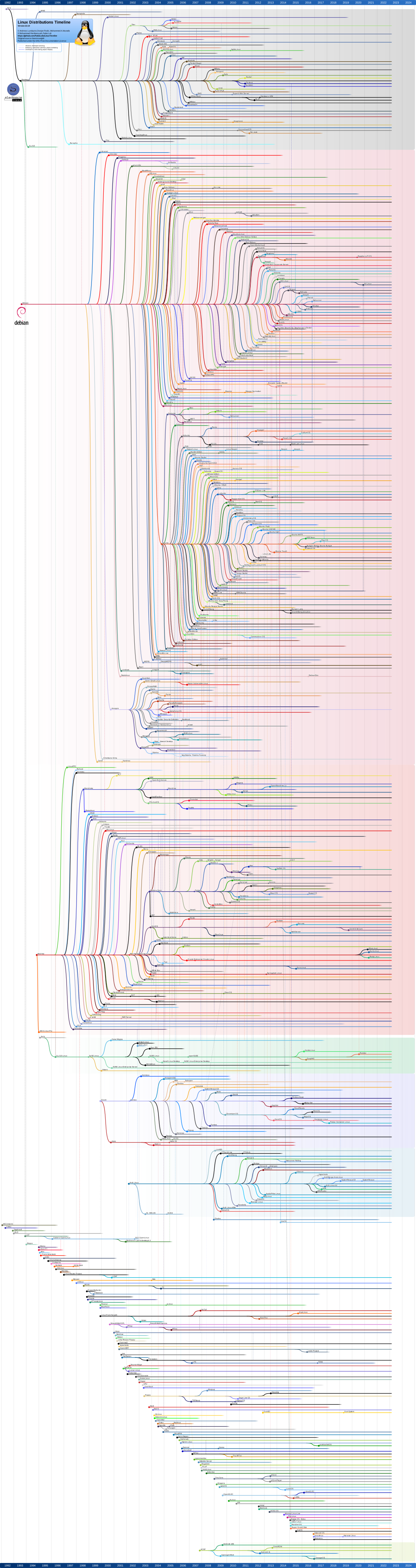
To show you how many distros there really are i will leave you with a link to a comprehensive picture, thank you for reading.
https://upload.wikimedia.org/wikipedia/commons/1/1b/Linux_Distribution_Timeline.svg
 Jumbled thoughts